← Back to Blog
Series: Building an Agentic RAG Platform From Scratch
- Part 1: The Ingestion Pipeline (you are here)
- Part 2: Why Vector Search Alone Isn't Enough — coming soon
- Part 3: From Search to Conversational Agent — coming soon
- Part 4: Connecting AI to Real Business Data — coming soon
Most RAG tutorials start with a clean CSV and end with a chatbot that answers questions about a restaurant menu. We started with 60GB of scanned PDF catalogs — 17,000 documents, nearly a million pages — some from the 1970s, in five different languages, with coffee stains on the pages — and needed to build a system that could find a specific tractor part number in under two seconds.
This is the story of how we built that system. Not the theory. The actual engineering decisions, the things that broke, and the patterns that survived production.
The Problem
Our client sells tractor parts. Their knowledge base is roughly 17,000 PDF catalogs — nearly a million pages, roughly 60GB of data covering brands like IMT, Zetor, Case IH, Deutz-Fahr, and Fiat. Some catalogs are digital (selectable text). Most are scanned images of decades-old printed manuals. The text is in Serbian, English, German, Italian, Czech — sometimes multiple languages on the same page.
A customer calls and says: "I need a water pump for an IMT 539." The employee currently flips through binders, cross-references catalog numbers by memory, and hopes they grab the right page. This takes 5-15 minutes per inquiry. Multiply that by 50 calls a day.
The math that justified the project
Let's put a number on the pain:
- 50 inquiries/day at an average of 10 minutes each = 8.3 hours of manual lookup per day
- That's one full-time employee doing nothing but flipping through binders
- Experienced staff answer faster, but they're also the most expensive — and when they leave, the knowledge walks out the door with them
- Wrong part numbers mean returns, reshipping costs, and frustrated customers. Each mistake costs the business far more than the part itself
After deploying this system, lookup time dropped from 10 minutes to under 5 seconds. Junior staff now answer inquiries with the same accuracy as the most experienced employee. The system paid for itself within weeks — not months.
The goal: type "pumpa vode IMT 539" and get the exact catalog page, part number, and compatibility info in seconds.
Architecture Overview
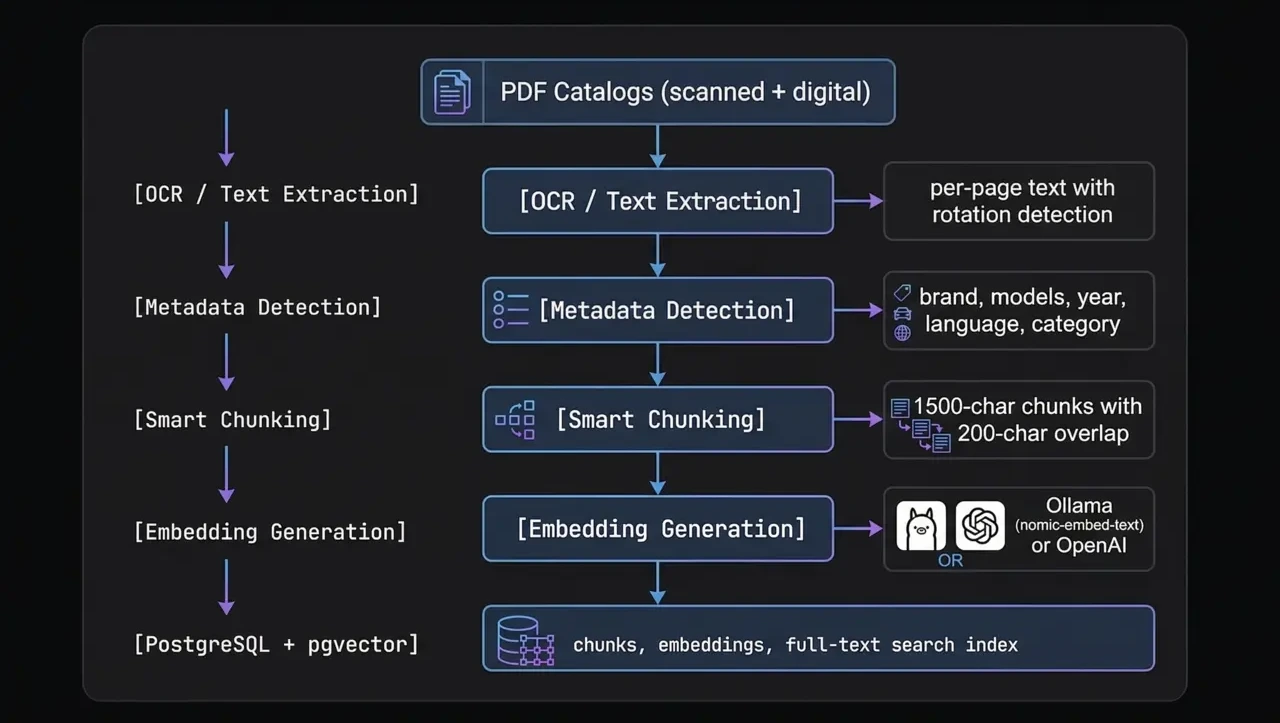
Every piece of this pipeline exists for a reason we learned the hard way. Let's walk through each one.
Step 1: Extracting Text From PDFs That Don't Want to Be Read
The first lesson: not all PDFs are created equal. A "digital" PDF has selectable text baked in. A "scanned" PDF is just a stack of images pretending to be a document. You need to handle both, and you need to detect which is which automatically.
Our extractor tries the fast path first — pdfplumber for digital text extraction. If a page yields less than 50 characters, it's probably scanned, and we fall back to OCR with Tesseract.
# Simplified extraction logic per page
text = pdfplumber_page.extract_text() or ""

if len(text.strip()) < 50:
    # Scanned page — convert to image and OCR
    image = convert_from_path(pdf_path, first_page=page_num, last_page=page_num)
    text = pytesseract.image_to_string(image[0], lang="eng+srp_latn+deu+ita")
But here's where it gets interesting. Scanned catalogs from the 1970s weren't scanned with care. Pages are rotated 90°, 180°, or slightly skewed. OCR on a rotated page returns garbage.
We added per-page rotation detection. Before OCR, we try four orientations (0°, 90°, 180°, 270°) on a sample of the page, score the output by the ratio of recognizable words, and use the orientation that produces the most coherent text. It sounds expensive but runs in parallel — and the alternative is unusable output.
The multilingual OCR problem
Tractor catalogs are international. A Zetor catalog is in Czech. Deutz is in German. Fiat is in Italian. IMT is in Serbian Latin script. And many catalogs mix languages — English part names with Serbian descriptions.
We detect which Tesseract language packs are installed at runtime and load all of them simultaneously:
# We support 9 languages for tractor catalogs:
# eng, srp_latn, deu, ces, slk, fra, pol, hun, ita
#
# At runtime, only installed languages are used
ocr_langs = detect_installed_langs()  # e.g. "eng+srp_latn+deu+ita"
text = pytesseract.image_to_string(image, lang=ocr_langs)
This is slower than single-language OCR but dramatically more accurate for our use case. A page with Italian headers and English part tables gets both right instead of garbling one.
Step 2: Automatic Metadata Detection
Raw text isn't enough. If someone searches for "filter ulja za Zetor 5011", we need to know which catalogs are for Zetor tractors and which cover the 5011 model. Manually tagging hundreds of PDFs is not an option.
Our metadata detector uses a two-pass approach:
- LLM analysis — We send the first 5 pages of text (up to 3,000 characters) to OpenAI and ask it to identify the brand, tractor models, year range, language, and part category (engine, transmission, hydraulics, etc.)
- Regex fallback — If the LLM is unavailable or gives low-confidence results, we fall back to pattern matching against a database of known brand names and model number formats
The folder structure provides hints too. Catalogs are organized as data/catalogs/IMT/539/imt539_motor.pdf, so the path tells us the brand. But we never trust the folder for model numbers — a catalog filed under "539" might actually cover models 533 through 542. Only the LLM or the actual catalog text is authoritative for model compatibility.
The category detection is particularly useful. If a catalog is about "motor" (engine), we tag it as such. Later, when someone searches for "pumpa vode" (water pump), we can boost results from engine-category catalogs because water pumps live in the engine section.
Step 3: Smart Chunking — Why Page-Level Embeddings Fail
This is where most RAG tutorials get it wrong. The naive approach is: one page = one embedding. Simple, clean, and produces terrible search results.
Why? A tractor catalog page is dense. A single page might list 30 different parts across a table with position numbers, descriptions, quantities, and cross-references. When you embed the entire page as one vector, you get a blurry average of everything on that page. The embedding for "water pump" gets diluted by "thermostat gasket," "coolant hose," and "fan belt" all on the same page.
Our chunker splits each page into ~1,500 character chunks with 200 characters of overlap:
TARGET_CHUNK_CHARS = 1500   # ~500 tokens for mixed content
OVERLAP_CHARS = 200         # catches boundary matches
MIN_CHUNK_CHARS = 100       # no tiny fragments

# Split points, in priority order:
# 1. Double newline (section break)
# 2. Single newline
# 3. Sentence end (period + space)
# 4. Any space
The overlap is critical. Without it, a part number that straddles a chunk boundary gets split across two chunks and becomes invisible to search. 200 characters of overlap means we duplicate ~13% of content but catch nearly all boundary cases.
The smart split-point selection matters too. We don't just cut at character 1,500 — we look for the nearest natural break (section boundary, newline, sentence end) within a ±20% window. This keeps semantic units together instead of splitting a table row in half.
A catalog page with 30 parts at page-level granularity is noise. The same page split into 4-5 focused chunks becomes signal.
Step 4: Generating Embeddings
Each chunk gets converted to a vector embedding — a numerical representation that captures its semantic meaning. We support two embedding providers:
- Ollama with
nomic-embed-text— runs locally, free, good enough for development and small deployments - OpenAI with
text-embedding-3-small— better quality, ~$0.02 per million tokens, what we use in production
Embedding nearly a million pages of chunks is not a quick operation. We built the embedder to be resumable and parallel:
# Parallel embedding with configurable workers
EMBED_WORKERS = 4        # Ollama (CPU-bound)
OPENAI_EMBED_WORKERS = 8 # OpenAI (IO-bound, respects rate limits)
EMBED_SAVE_BATCH = 500   # Flush to DB every 500 embeddings

# Only embed chunks that don't have embeddings yet
# This makes re-runs fast — only new/changed content gets processed
The resumability point is underrated. Our largest catalog (a 938-page Fiat manual) took over an hour to process. If the process crashes at page 800, you don't want to start over. Each chunk's embedding status is tracked in the database, so a restart picks up exactly where it left off.
Step 5: Storage — PostgreSQL With pgvector
We store everything in PostgreSQL with the pgvector extension. Not Pinecone. Not Weaviate. Not Chroma. Just Postgres.
Why? Because we already need a relational database for catalog metadata, product inventory, customer orders, and analytics. Running a separate vector database means another service to maintain, another failure point, and a constant sync problem between "the data" and "the vectors."
With pgvector, our chunks table looks like this:
CREATE TABLE chunks (
    id SERIAL PRIMARY KEY,
    catalog_id INTEGER REFERENCES catalogs(id),
    page_number INTEGER,
    chunk_index INTEGER,
    content TEXT,
    content_fts tsvector,          -- PostgreSQL full-text search
    embedding vector(768)           -- pgvector column
);

CREATE INDEX ON chunks USING ivfflat (embedding vector_cosine_ops)
    WITH (lists = 100);
CREATE INDEX ON chunks USING gin (content_fts);
That content_fts column is going to be important in Part 2. Spoiler: vector search alone misses exact part number matches, and full-text search alone misses semantic queries. The magic is in combining both.
What We Learned
After processing hundreds of catalogs through this pipeline, here are the lessons that aren't in any tutorial:
- OCR quality is your ceiling. No amount of clever retrieval or prompt engineering will fix garbage text. Invest heavily in the extraction step. Rotation detection alone improved our search accuracy by ~25%.
- Chunk size is a tuning knob, not a constant. We started at 500 characters (the default in most tutorials) and couldn't find anything. Went to 3,000 and got too much noise. 1,500 with 200 overlap was our sweet spot for dense technical catalogs. Yours will be different.
- Metadata is not optional. Without brand/model tags on catalogs, every search returns results from every brand. The user searches for a Zetor part and gets Case IH pages. Metadata turns a mediocre search into a precise one.
- Build for resumability from day one. Processing pipelines crash. APIs rate-limit you. Power goes out. If your pipeline can't resume, you'll waste days re-processing.
- Keep it boring. PostgreSQL, Python, Tesseract. No exotic dependencies, no bleeding-edge vector DBs that might pivot their pricing model next quarter. The boring stack runs in production while the exciting stack runs in demos.
What's Next
With our knowledge base ingested, chunked, and embedded, we have the raw material. But turning that into accurate search results is a separate challenge entirely.
In Part 2, we'll cover why vector search alone gets maybe 60% accuracy on our dataset, how we combine it with full-text search using Reciprocal Rank Fusion, and the progressive fallback strategy that handles everything from exact part number lookups to vague natural language queries.
Stay tuned — Part 2 drops next week. If you don't want to miss it, subscribe below or follow us on LinkedIn.
Need a RAG system built for your business?
We build production AI systems — document search, chat agents, and custom integrations. Not demos. Working software.
Book a Free Call